nvidia SDK jetpack 6.2에서 생긴 에러..
6월 업데이트 된 SDK 6.2.1에서는 패치 되었다.!
jetpack을 설치 후,
docker run —rm —network=host hello-world
는 문제 없이 작동하지만,
docker run —rm hello-world
는 아래처럼 iptables failed error가 뜰 수 있다.

docker: Error response from daemon: failed to set up container networking: driver failed programming external connectivity on endpoint alpine (d373025c7fbf1f880fe55171c6673b2b8f036ee84160128712ffde9980c02266): Unable to enable DIRECT ACCESS FILTERING - DROP rule:  (iptables failed: iptables --wait -t raw -A PREROUTING -p tcp -d 172.17.0.2 --dport 80 ! -i docker0 -j DROP: iptables v1.8.7 (legacy): can't initialize iptables table `raw': Table does not exist (do you need to insmod?)
Perhaps iptables or your kernel needs to be upgraded.
 (exit status 3))

Run 'docker run --help' for more information
만약, docker —version을 했을 때,
28.x 버전이 나온다면, iptables 로 인한 문제가 발생할 수 있다.
골치 아픈게.. docker image를 실행하는 것은 문제가 안되지만, devcontainer로 열었을 때, host args를 options에 넣어도 안된다.
이걸 해결하려면 Docker 27.5.1 다운그레이드를 해주면 된다. (https://github.com/moby/moby/issues/49557)
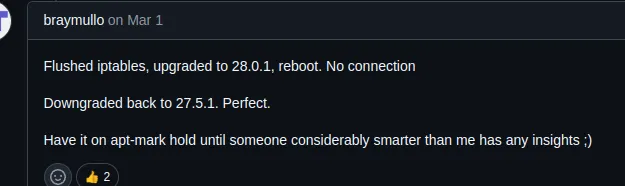
[해결 방법]
🔹 1. 현재 Docker 제거 (설정은 유지됨)
sudo apt-get remove docker-ce docker-ce-cli containerd.io docker-buildx-plugin docker-compose-plugin
🔹 2. 사용 가능한 버전 확인
containerd.io, buildx, compose의 버전은 시스템에 따라 다를 수 있으니 아래 명령어로 먼저 확인
apt-cache madison docker-ce docker-ce-cli containerd.io docker-buildx-plugin docker-compose-plugin docker-ce-rootless-extras
🔹 3. Docker 27.5.1 및 관련 패키지 정확히 설치
사용 가능한 버전 확인 후, 가능한 버전에 맞춰서 설치.
sudo apt-get install \
  docker-ce=5:27.5.1-1~ubuntu.22.04~jammy \
  docker-ce-cli=5:27.5.1-1~ubuntu.22.04~jammy \
  containerd.io=1.6.25-1 \
  docker-buildx-plugin=0.20.0-1~ubuntu.22.04~jammy \
  docker-compose-plugin=2.32.4-1~ubuntu.22.04~jammy \
  docker-ce-rootless-extras=5:27.5.1-1~ubuntu.22.04~jammy
🔹 4. Docker 버전 고정 (자동 업데이트 방지)
sudo apt-mark hold docker-ce docker-ce-cli containerd.io docker-buildx-plugin docker-compose-plugin docker-ce-rootless-extras
🔹 5. Docker 데몬 재시작
sudo systemctl daemon-reexec
sudo systemctl restart docker
🔹 6. Docker 버전 확인
sudo docker version
Docker version 27.5.1이 표시되면 더이상 iptable_raw 에러는 발생하지 않을 것이다.
이런 문제가 발생하는 이유는
Docker 28.0.0부터 새로운 네트워크 보안 필터 기능인 Direct Access Filtering이 기본 활성화됨으로 인해 문제가 발생한다고 한다
Docker 공식 릴리즈 노트 (28.0.0 기준): (Docker Engine Release Notes – 28.0.0)
"Introduced a new Direct Access Filtering mechanism for improved bridge network security."
"This adds DROP rules in the iptables raw table to prevent external access to container IPs."
Docker 27까지는 기본 네트워크 정책에서 raw 테이블을 사용하지 않았기 때문에 iptable_raw 모듈이 없어도 컨테이너 실행과 포트 매핑이 정상 동작했다.
재밌는 사실은 arm이 아닌 amd에서는 iptable_raw 문제가 없이 정상 작동한다는 사실이다.
이에 대해 chat GPT에 물어본 결과.
Jetson Orin Nano 등 NVIDIA Jetson 시리즈는 L4T(Linux for Tegra)라는 커스터마이징된 Ubuntu 기반 커널을 사용하며:
- 일부 모듈이 제거됨 (ex. iptable_raw, nf_tables)
- 모듈 자동 로딩이 제한됨
- bridge, raw, nat 관련 기능이 축소되어 있음
→ 결과적으로 iptables -t raw 명령 자체가 불가능하며 Docker가 실패하는 것.
이라는 답변을 받았다.
'Robotics > Jetson' 카테고리의 다른 글
| [NVIDIA Jetson] Jetson에서 Power Mode 설정과 최대 성능을 끌어내는 방법 (0) | 2025.06.29 |
|---|---|
| [NVIDIA Jetson] install utils (0) | 2025.06.11 |
| [NVIDIA Jetson] VScode install in Jetson (0) | 2025.06.05 |
| [NVIDIA Jetson] JETPACK install (젯팩 설치 방법) (0) | 2025.06.05 |
| [NVIDIA Jetson] Nvidia SDK manager install (0) | 2025.06.05 |